HubSpot Onboarding: Process, Duration, Costs, and Common Mistakes
What is HubSpot onboarding, and how does it work?
HubSpot onboarding is the structured introduction and technical setup of the HubSpot platform for a company. It includes process analysis, setting up the CRM data architecture, data migration, and configuring automations, reports, and employee training. The goal is to optimally adapt the software to existing marketing, sales, and service processes—rather than the other way around.
Table of Contents
Setting up a HubSpot account is quick and easy. But to ensure that marketing, sales, and customer service truly work together efficiently, it takes more than just a few data fields, a sales pipeline, and some basic automations.
Professional HubSpot onboarding ensures that the software fits your company’s processes—not the other way around. This includes analyzing existing workflows, configuring the CRM system, migrating existing data, exploring potential integrations, and training your employees.
How time-consuming this will be depends on your starting point. A company implementing a CRM for the first time has different requirements than a medium-sized business that wants to consolidate multiple sales teams, existing customer data, and an ERP system into HubSpot.
In this article, we’ll show you how a professional HubSpot onboarding process works, what factors influence its duration and cost, and what you should keep in mind to ensure the implementation is successful in the long term.
What is HubSpot onboarding?
HubSpot onboarding refers to the structured introduction and setup of the HubSpot platform for a company. The goal is to map out the relevant business processes in HubSpot, import existing data in a meaningful way, and prepare employees to use the platform.
Depending on the requirements, the onboarding process may include, among other things:
- Strategy and Process Analysis: What goals should be achieved, and which existing processes should be improved?
- CRM Configuration: Setting up contacts, companies, deals, pipelines, data fields, and permissions.
- Data Migration: Importing existing customer and sales data from other systems.
- System Integrations: Integrating systems such as ERP systems, email services, or existing business applications.
- Automation: Setting up workflows, notifications, and recurring processes.
- Reporting: Defining and setting up relevant metrics and dashboards.
- Training and Knowledge Transfer: Empowering employees to use HubSpot independently and effectively.
It’s important to make a key distinction here: Not every HubSpot onboarding automatically constitutes a comprehensive CRM implementation.
For a smaller company, simply setting up a structured sales pipeline with the appropriate data fields and providing training may be sufficient. For more complex requirements, data architecture, custom interfaces, multiple business units, and extensive automation come into play.
The key is not to set up as many HubSpot features as possible, but to implement the ones that actually improve your business processes.
The 7 Phases of a Successful HubSpot Onboarding
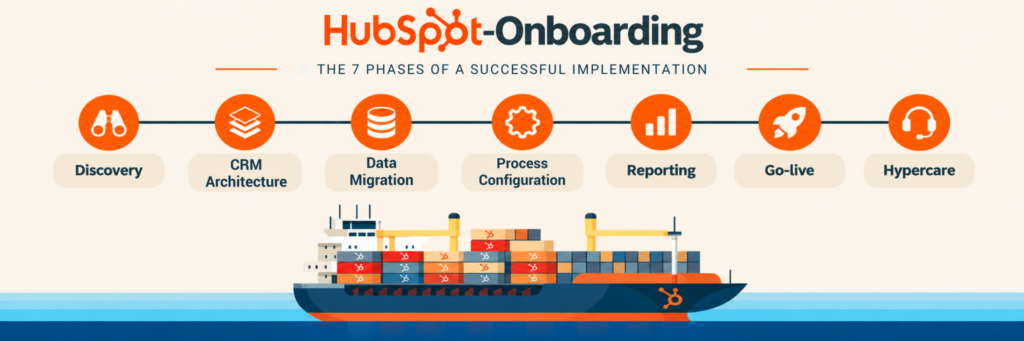
A professional HubSpot onboarding process follows a clear project plan. While the scope and order may vary, the basic tasks generally remain the same.
1. Discovery & Solution Design: Understanding Goals and Processes
Before setting up the first data fields, it should be clear what role HubSpot is expected to play within the company.
In a joint workshop, we analyze your existing marketing, sales, and—if applicable—service processes. In doing so, we examine not only your current system landscape but also typical challenges encountered in day-to-day operations.
For example:
- How are new leads captured and qualified?
- How does the handoff between marketing and sales take place?
- What steps does a sales opportunity go through before it is closed?
- What information is needed for quotes and customer service?
- What information comes from other systems?
- What key performance indicators does management need for decision-making?
These requirements form the basis for a concrete solution design: a business and technical foundation for the subsequent implementation.
In our experience, the truly important questions often arise as early as this phase. For example, when different departments use the same terms but interpret them to mean different processes.
That’s exactly why it’s worth investing enough time here. New software doesn’t automatically improve unclear processes.
2. Define the CRM architecture and data model
Once the processes have been defined, a suitable HubSpot structure is developed based on them.
The focus is on CRM objects such as contacts, companies, and deals, as well as their attributes and relationships to one another.
A typical example is defining a sales pipeline.
This isn’t just about the names of the individual stages. We also clarify when a sales opportunity can move to the next stage, what information is required for that, and who is responsible.
In addition, the following topics, among others, are taken into account:
- Definition of Required Data Fields and Mandatory Information
- Structure of the sales pipelines
- Mapping of contacts, companies, and deals
- Setting up teams, users, and permissions
- Defining data responsibilities
- Preparing reporting and automations
A clearly defined data model is particularly important when multiple departments or locations are to work together using HubSpot.
A well-designed CRM architecture prevents what starts out as a simple solution from becoming a system that is difficult to maintain over the years.
3. Data Migration and Integration of Existing Systems
Many companies don’t start from scratch. Customer data is already stored in Excel files, an existing CRM, an ERP system, or various siloed solutions. This data must first be verified and then imported in a targeted manner.
Typical challenges include duplicate contacts, varying spellings, missing required information, and inconsistent customer master data.
The relationships between data records are also important. For example, a contact person may be assigned to multiple companies, or a company may have several sales opportunities active at the same time.
A professional migration, therefore, involves more than simply importing data. First, it’s determined which information is actually needed and how it should be mapped in HubSpot going forward.
Connecting HubSpot to ERP Systems
For medium-sized companies, integration with existing ERP systems is also often necessary. These include, for example, SAP, Microsoft Dynamics 365 Business Central , or other industry-specific business applications and ERPs.
Before proceeding with integration, three questions in particular should be clarified:
- Which system is the primary source for which data? For example, customer master data might be maintained in the ERP, while sales activities take place in HubSpot.
- What information needs to be synchronized? Not all information needs to be available in both systems.
- In which direction should data be transferred? Depending on the business process, one-way or two-way synchronization may be appropriate.
Error handling, duplicate detection, and the ongoing maintenance of an interface are also part of the planning process.
Standardized integration options already exist for many requirements. However, for custom business processes, a tailor-made interface may be necessary.
4. Set up marketing, sales, and service processes
Once the data structure is in place, the actual workflows are implemented in HubSpot.
In sales, for example, lead qualification, task assignment, deal pipelines, quote processes, and follow-ups can be set up.
In marketing, the focus is often on lead generation, forms, campaigns, contact segmentation, email marketing, and handing off qualified leads to sales.
In customer service, ticket pipelines, responsibilities, and structured handling processes can be added.
In doing so, we assess which requirements HubSpot already covers by default and where additional configurations or integrations are necessary.
Using Automation Strategically
A major advantage of HubSpot is the ability to automate recurring tasks.
Examples include:
- Automatic assignment of new leads to the appropriate sales representative
- Notifications for important changes in the sales process
- Creation of tasks for necessary follow-ups
- Handoff of qualified leads between marketing and sales
- Automated customer communication based on defined events
However, not every manual process should be automated right away. If a process is unclear from a technical standpoint, automating it often only leads to errors occurring more quickly and on a larger scale.
Our recommendation is therefore: First, simplify the process; then, automate it in a meaningful way.
5. Set Up Reporting and Dashboards
A CRM system should not only collect data but also enable better decision-making. That’s why, right from the design phase, we determine which metrics will be analyzed in HubSpot in the future.
For sales, these might include, for example:
- Number of new and qualified leads
- Progress of open sales opportunities
- Closing rates and average sales cycle duration
- Expected revenue from the deal pipeline
- Sales activities and follow-up status
In marketing, the focus is often on campaign performance, lead sources, and the conversion of leads into sales opportunities.
It’s important that a dashboard isn’t just visually appealing, but is also based on a reliable data foundation.
For example, a revenue forecast can only be meaningful if deal stages, closing probabilities, and expected closing dates are consistently maintained.
That is why we do not view reporting as an isolated final step in a project, but rather as an integral part of the overall CRM strategy.
6. Testing, Training, and Go-Live
Before HubSpot is put into production, the most important business processes should be tested. These include, among other things, creating new records, assigning responsibilities, transitioning between deal stages, and ensuring that automated processes run correctly.
For existing interfaces, checks are also conducted to ensure that the agreed-upon data is reliably transferred between the systems. At the same time, employees are being prepared for their future responsibilities.
For example, a sales team needs different training content than marketing managers or administrators. That’s why we focus on hands-on training in which participants work with their actual use cases as much as possible.
After all, a successful CRM project doesn’t end with the software working from a technical standpoint.
The implementation will only be successful if your employees are able to work with HubSpot and actually use the system in their day-to-day work.
7. Hypercare and Continuous Optimization
Even after a successful go-live, new questions arise. Some processes behave differently than expected in actual operation. Employees discover additional requirements, and certain automations need to be adjusted.
That’s why a temporary hypercare phase can be useful.
During this phase, open questions are answered, errors that arise are analyzed, and necessary adjustments are made. Afterward, the company should be able to implement as many day-to-day changes as possible on its own.
This is exactly where our principle of “helping people help themselves” comes into play: We don’t want you to have to rely on outside assistance indefinitely for every minor CRM adjustment.
How long does HubSpot onboarding take?
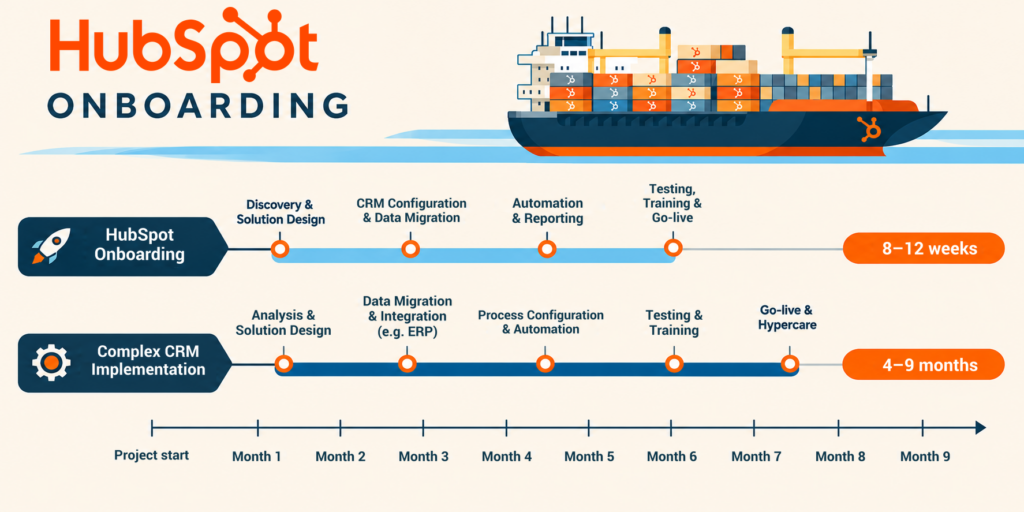
The duration of a HubSpot onboarding process depends primarily on the scope of the project, the complexity of the business processes, and the quality of the existing data.
A standardized onboarding process with a manageable number of users and few custom requirements can be completed within a few weeks.
In contrast, a large-scale CRM implementation involving multiple departments, data migration, and custom ERP interfaces can take several months to complete.
The following factors have a particularly significant impact:
- Project Scope: Will only sales processes be implemented, or will marketing and customer service be included as well?
- Data quality: Is existing customer data already structured and cleaned?
- Integrations: Do other systems need to be integrated?
- Internal Resources: Are the necessary contacts available for workshops, decision-making, and testing?
- Decision-making processes: How quickly can requirements and technical concepts be approved?
A common cause of delays lies not in the HubSpot configuration itself, but in pending internal decisions. For example, if it is unclear which department should be responsible for maintaining certain customer data, this issue cannot be resolved solely through a technical setting.
That is why we recommend agreeing on a realistic schedule with clear responsibilities and decision points right at the start of the project.
How much does professional HubSpot onboarding cost?
It would be irresponsible to give a blanket answer to this question.
The cost of HubSpot onboarding depends on which tasks are to be handled and how complex the existing system landscape is.
First, it’s important to distinguish between three cost categories.
1. HubSpot License Costs
The cost of the software depends on the products used, license editions, the number of user seats required, and any additional features.
Not every company needs an enterprise solution right from the start. Conversely, certain requirements regarding permissions, data architecture, or automation may necessitate a higher edition.
The appropriate licensing structure should therefore be determined based on the actual requirements.
2. One-time implementation costs
One-time project costs arise from design, setup, data migration, automation, integrations, and training. The more systems, business units, and individual processes that need to be taken into account, the higher the implementation effort typically is.
A key cost factor here is not the number of data fields created, but rather the effort required to clearly define the underlying processes and dependencies.
3. Ongoing Support and Further Development
After the go-live, additional costs may arise for support, the maintenance of individual integrations, or the ongoing development of the system.
These services should be considered separately from the one-time implementation costs during project planning.
Which employees need to be involved in the HubSpot onboarding process?
Professional HubSpot onboarding is not merely an IT project. For a successful implementation, future users and subject matter experts must be involved early on.
Typically, the following roles are relevant:
- Internal Project Manager: Coordinates collaboration, facilitates decision-making, and monitors project progress.
- Sales managers: Define sales processes, deal stages, responsibilities, and reporting requirements.
- Marketing managers: Define lead generation, campaigns, automations, and the handoff to sales.
- IT managers: Provide support for interfaces, security, user management, and technical dependencies.
- Key Users: Test the planned processes and provide input based on day-to-day work requirements.
- Executive Management or Project Sponsor: Secures resources and makes overarching decisions.
Not every role needs to be involved to the same degree throughout the entire project. However, it is important that the appropriate points of contact are available when technical decisions, data approvals, or tests are required.
Our recommendation: Appoint an internal project manager as early as possible and at least one key user responsible for each department.
The 5 Most Common Mistakes During HubSpot Onboarding
From our experience working on CRM and HubSpot projects, we know that challenges often don’t stem from the technology itself. What matters most is how carefully the implementation is prepared and supported within the company.
Mistake 1: Adopting Existing Processes Without Reviewing Them
Implementing a CRM system is a great opportunity to reevaluate inefficient processes. If you simply replicate existing Excel spreadsheets, approval workflows, and manual tasks in HubSpot, you’re often only tapping into a fraction of the platform’s potential.
A better approach: First, define the desired target process, and then decide how to implement it in HubSpot.
Mistake 2: Underestimating Data Quality
Duplicate contacts, missing company assignments, and inconsistent data fields make it difficult to use the data later on. If you migrate these issues without checking them, you’ll carry them over into the new system.
A better approach: Analyze data sources, define cleansing rules, and test the migration using a representative data set.
Mistake 3: Automating Too Much Too Soon
At first glance, complex workflows seem appealing. However, they can cause significant problems if data quality and processes are not yet stable.
A better approach: Start with just a few business-critical automations and test their functionality under realistic conditions.
Mistake 4: Involving Employees Too Late
A CRM system can be technically excellent but still fail in day-to-day use if users do not understand or accept the new processes.
A better approach: Involve key users early on, test real-world use cases, and conduct role-specific training.
Mistake 5: Failing to assign responsibility after the go-live
Without clear lines of responsibility, new data fields, conflicting processes, and undocumented changes will arise over time.
A better approach: Establish an internal CRM lead and define binding rules for changes, data maintenance, and further development.
HubSpot Onboarding with Growth Ninjas: Our Approach
As a HubSpot Diamond Solution Partner, we help companies implement, optimize, and integrate the HubSpot platform.
In doing so, we combine technical implementation with an understanding of marketing, sales, and business processes.
Our approach is based on four core principles:
- Strategy, Not Reactionary Action: We first clarify goals and requirements before configuring functions.
- Technology with a Purpose: We implement solutions that make sense for the company—not just everything that’s technically possible.
- Effective teamwork: We collaborate with the relevant employees and draw on their experience from day-to-day operations.
- Empowering self-reliance: We provide the necessary knowledge so that companies can use and further develop HubSpot as independently as possible in the long term.
Our services range from structured CRM onboarding to data migration and automation, as well as the integration of existing systems such as SAP or Microsoft Dynamics 365 Business Central.
For more information, please visit our page on HubSpot consulting and implementation.
Conclusion: A good HubSpot onboarding process begins before the actual setup
Implementing HubSpot gives companies the opportunity to make lasting improvements to their marketing, sales, and service processes.
However, technical configuration alone is not the decisive factor. Successful HubSpot onboarding requires clear goals, a well-thought-out CRM architecture, reliable data, automation used effectively, and employees who can use the new system in their day-to-day work.
Those who take these fundamentals into account early on lay the groundwork for a CRM system that not only works in the short term but can also grow alongside the company’s evolving needs.
Are you planning to implement HubSpot or looking to optimize your existing CRM?
We’ll help you analyze your company’s needs, develop a realistic project roadmap, and integrate HubSpot effectively into your existing system landscape.
Frequently Asked Questions About HubSpot Onboarding
What does professional HubSpot onboarding involve?
A professional HubSpot onboarding process includes analyzing business processes, defining the CRM structure, performing technical configuration, and implementing the relevant marketing, sales, and service features. Depending on the project, this may also include data migration, system integrations, automation, reporting, and employee training.
How long does HubSpot onboarding take?
A simple onboarding process can be completed within a few weeks. For large-scale CRM implementations involving multiple departments, data migration, and complex integrations, the rollout can take several months. The key factors are the scope of the project, data quality, and the availability of internal resources.
How much does a HubSpot onboarding cost?
The costs depend on the scope of the implementation, the number of processes involved, the existing data environment, and the necessary integrations. Software licenses, one-time implementation costs, and ongoing support should be considered separately. A reliable cost estimate requires an analysis of the specific requirements.
Is HubSpot onboarding mandatory?
Professional HubSpot onboarding by an external partner is not strictly required. Companies can also set up and configure HubSpot on their own.
However, especially in the beginning, it’s worth turning to an experienced HubSpot partner who has already successfully guided numerous CRM implementations. This helps avoid common mistakes, set up processes effectively from the start, and minimize unnecessary detours.
This not only saves time but is also, in many cases, more cost-effective than having to spend significant effort later on correcting or restructuring a solution that was initially set up on your own.
A good HubSpot partner also ensures that your employees gain the knowledge they need to continue developing the system independently over the long term.
Can existing CRM data be migrated to HubSpot?
Yes. HubSpot supports the import of contacts, companies, deals, and other supported records. Before the migration, you should check data quality, duplicates, field mappings, and relationships between records.
Which employees should be involved in the HubSpot onboarding?
Typically, the project requires an internal project manager as well as designated points of contact from the relevant departments. For integrations and more complex requirements, IT managers should also be involved. Key users help test processes in a real-world setting and prepare for future use.
What happens after the HubSpot go-live?
After the go-live, key processes should be monitored, open questions answered, and necessary adjustments made. A temporary hypercare phase can help ensure a smooth transition to regular operations. Subsequently, an internal CRM team should coordinate ongoing development.